



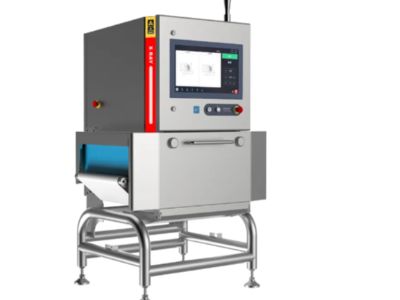
Adjusting the sensitivity of an X-ray checking machine is important. At COSO, we know that making sure the machine works well can help find problems in products. When you change the sensitivity settings, you can improve the quality of what you are checking. This article will give you helpful tips on how to optimize the sensitivity of your X-ray machine and how to fix common sensitivity problems.
How to Optimize X-Ray Machine Sensitivity for Enhanced Product Quality
To make your X-ray machine work better, you should start by understanding how sensitivity works. Sensitivity means how well the machine can detect different things in the products you are checking. If the sensitivity is too low, you might miss problems. If it is too high, you could get false alarms. Finding the right balance is key. First, you can look at the settings on the machine. Most food x-ray machine, including those from COSO, have a menu where you can adjust sensitivity levels. You might need to ask your technician for help if you are unsure. Next, consider the types of products you are checking. For example, if you are checking thin plastic items, you might need higher sensitivity to catch tiny defects. On the other hand, for thicker materials, lower sensitivity might be better. Testing is essential. Run some sample checks after adjusting the settings to see if the machine finds the right issues. You can also use different test pieces to see how the changes affect detection. If you notice that your machine is still not performing well, it might be time to clean the X-ray source or inspect the detectors. Dust and dirt can affect how well the machine works. Regular maintenance from a skilled technician will help keep everything in top shape. Finally, keep records of your settings and results. This will help you understand what works best over time. It can be useful for training new team members too. Remember, optimizing sensitivity is not just about getting numbers right; it’s about making sure your products are safe and high quality.
How to Troubleshoot Common Sensitivity Issues in X-Ray Inspection Machines
Sometimes, even the best X-ray machines can have problems with sensitivity. If your COSO X-ray machine is not working right, don’t worry; there are ways to fix it. First, check the settings. Sometimes, they can change by accident. If the sensitivity is set too low, you might miss defects. If it’s too high, you could get too many false alarms. Adjust the settings back to what you know worked well before. It may help to refer to the records you kept. Next, look at the machine itself. Is there any dirt or dust on the X-ray source or the detector? Cleaning these parts can make a big difference. Use a soft cloth and follow the machine’s cleaning instructions. If cleaning doesn’t help, it might be time to check the cables and connections. Sometimes, loose cables can cause sensitivity issues. Make sure everything is plugged in securely. If you are still having problems, consider running a calibration test. This test can help determine if the machine is working as it should. If the problem continues, you may need to contact a technician or customer support. They can help diagnose the problem and make sure everything is working properly. Remember, troubleshooting can take time, but it’s important to get your X-ray inspection machine back to its best. Keeping products safe is what we aim for at COSO, and ensuring your machine is sensitive enough is a big part of that.
Where to Find the Best Resources for X-Ray Machine Sensitivity Adjustment
If you own or work with an X-ray checking machine, you may need to adjust its sensitivity. This helps the machine detect objects better. To do this, it’s important to find good resources that can guide you through the process. One of the best places to start is the manual that comes with the X-ray machine. For machines made by COSO, the manual will have clear instructions on how to change sensitivity settings. Reading the manual carefully is a great first step. If you can’t find the manual, you can often find it on the COSO website. They usually have downloadable versions that are easy to read.
Another helpful resource is online forums or groups where people talk about X-ray machines. These forums can be full of helpful tips and tricks from other users. They may have already faced the same issues you are dealing with and can share their experiences. Sometimes, other users can give you advice on how to adjust sensitivity based on what they learned.
You can also check out videos on websites like YouTube. Many people create videos that show step-by-step instructions on how to adjust X-ray machine settings. Look for videos that focus on COSO machines specifically. This way, you can see the process in action, which might help you understand it better.
Finally, if you are still unsure about adjusting the sensitivity of your X-ray machine, consider reaching out directly to COSO’s customer support. They can provide expert help and answer any questions you have. Getting help from professionals ensures that you adjust the machine correctly and safely.
What Wholesale Buyers Need to Know About X-Ray Machine Sensitivity
If you are a wholesale buyer looking to purchase X-ray checking machines, understanding sensitivity is very important. Sensitivity refers to how well the machine can detect different objects, such as metals or plastics. A machine with higher sensitivity can find smaller or more hidden items. When buying an X-ray machine from COSO, you should ask about its sensitivity levels. It’s also helpful to know if the sensitivity can be adjusted, as this feature can make the machine more useful for different tasks.
Another thing to consider is the type of products you will be checking with the X-ray machine. Different products may require different sensitivity settings. For example, if you are checking food items, you might want a machine that can detect small pieces of metal. On the other hand, if you are checking larger packages, you may not need as high sensitivity. Make sure to discuss your specific needs with the COSO sales team. They can recommend the best machine for your situation.
It’s also important to consider the training that comes with the machine. A good X-ray inspection equipment should come with training on how to adjust sensitivity settings. This training is crucial for your staff to ensure they can use the machine effectively. If the machine does not come with training, ask if COSO offers training sessions or materials.
Lastly, don’t forget to think about maintenance. Regular maintenance helps keep the machine working well, including its sensitivity. Ask COSO about maintenance options and how often you should check sensitivity settings. This information is key to making sure that your X-ray machine performs well for a long time.
How to Improve Detection Rates by Adjusting X-Ray Machine Sensitivity
Improving detection rates with your X-ray checking machine is possible by adjusting its sensitivity settings. Higher sensitivity allows the machine to find smaller or more difficult items. If you want to improve detection rates, the first step is to understand the current sensitivity level of your COSO machine. You can usually find this information in the machine’s manual or settings menu.
Once you know the current sensitivity level, you can begin to make adjustments. Start by carefully following the instructions in the manual. It may involve changing settings using buttons or a touchscreen. When you adjust sensitivity, it’s a good idea to test the machine after each change. You can do this by running test items through the machine to see if it detects them.
If you find that the machine is missing some items, try increasing the sensitivity. But be careful! If you set the sensitivity too high, the machine may create too many false alarms. This can make it harder to find real problems. It’s about finding the right balance.
Another way to improve detection rates is to regularly clean your industrial x-ray inspection equipment. Dust or dirt can affect how well the machine works. Make sure to follow the cleaning instructions in the manual to keep the machine in good shape.
Finally, training your staff is also key. Make sure everyone knows how to use the machine and understands sensitivity settings. Regular training can help them feel more confident and capable. When everyone knows what they are doing, the detection rates will improve even more. By adjusting sensitivity and keeping everything well-maintained, your COSO X-ray checking machine can work better and help you find what you need.
Table of Contents
- How to Optimize X-Ray Machine Sensitivity for Enhanced Product Quality
- How to Troubleshoot Common Sensitivity Issues in X-Ray Inspection Machines
- Where to Find the Best Resources for X-Ray Machine Sensitivity Adjustment
- What Wholesale Buyers Need to Know About X-Ray Machine Sensitivity
- How to Improve Detection Rates by Adjusting X-Ray Machine Sensitivity


